Monthly Online QuickBooks Training - from Industry Experts

Join us online and participate in the next instructor-led QuickBooks Training class. Build the skills you need to move your career forward - no boring lectures, no pre-recorded material, just real teaching and real Q&A.

More Affordable training option

Education built for busy professionals


Every live class is kept small so you can ask questions and get real answers. We've trained thousands of learners across multiple industries, and every instructor is a working practitioner with current, hands-on experience in the field they teach - not just a presenter simply reading from a script.

Save Money

Our live, online training class options eliminate expensive travel and on-site costs, helping us to keep our online class prices more affordable. You still receive small class sizes, personal attention, and professional & friendly instructors - without the added travel costs associated with on-site trainings.

Same Lessons

We follow the same lesson plan, same curriculum, and the same practical real-world applications as the on-site courses - equipping you with the skills necessary to streamline and simplify your day-to-day bookkeeping tasks.

Save Time

Skip the travel and time away from work. Our convenient online classes let you learn from the comfort of your own home or office, with shorter daily sessions to better fit your schedule.

9am - 1pm Pacific each day most classes.


Same Guidance

You'll receive the same experienced, trusted, and patient instructors as our on-site trainings - delivered conveniently online. We will be with you answering questions, providing guidance, and helping you work through real-world issues as they come up.

quotesArtboard 1 copy 2

Thanks for a Great Class! I was apprehensive about taking a QuickBooks class online because of the interaction and keeping my attention for 3 days in front of a computer. I had worked in a pharma training department, as well as in a territory as a regional sales trainer, where we used online Go To Meeting training for all of our training and certification needs. I have attended over 100 online training sessions in my career and this is one of the best classes that I have ever attended! Cecilia Hayes' style allows student interaction along with real world examples based on your needs. She is a 'Guru'!  I look forward to taking advanced classes with her in the future." 

 - Kane H.

Oklahoma City

What you'll Learn

  • Get comfortable with the QuickBooks interface and navigation
  • Create accurate financials statements....and understand them
  • Record sales and expenses
  • Learn time-saving tips and tricks and processes
  • Save time with recurring transactions and online banking
  • Understand bank reconciliation fundamentals
  • Set up products and services correctly and fix those that aren't
  • Build professional estimates and propsoals
  • Generate and send invoices efficiently
  • Track and record expenses properly
  • And much more...........

Which version of QuickBooks can we help you with?

QuickBooks is one of the most powerful accounting tools available for small and medium sized businesses. Understanding its core features can dramatically improve how you manage your finances.
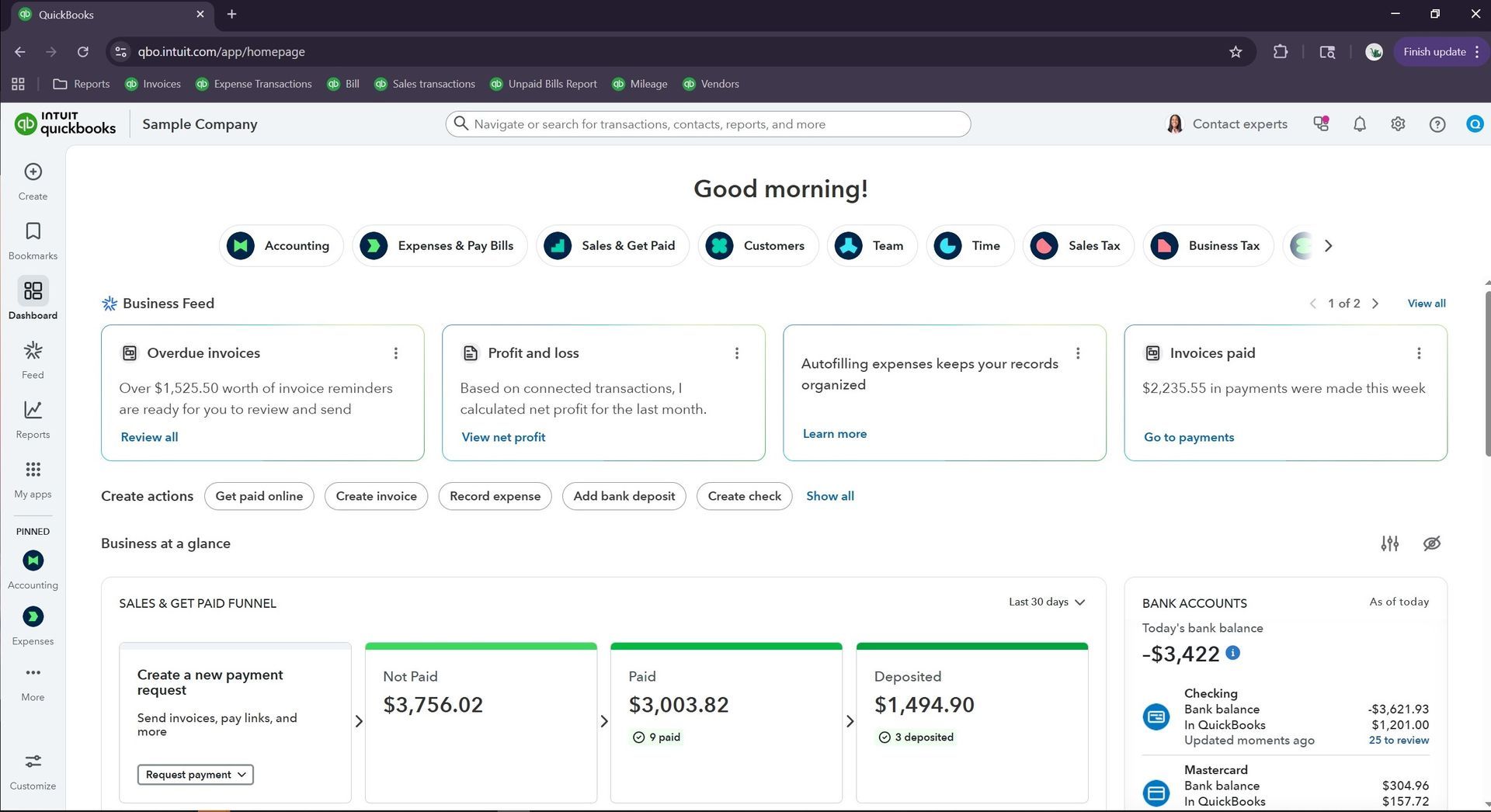
Quickbooks Online Homepage

QuickBooks Online is a cloud based version of the software accessible from any device with an internet connection. Ideal for companies needing remote access and collaboration. Suitable for service-based businesses or those with light inventory. This version has a feature rich mobile app, strong automation capabilities, and connects to hundreds of third-party apps.

QuickBooks Online Classes ->

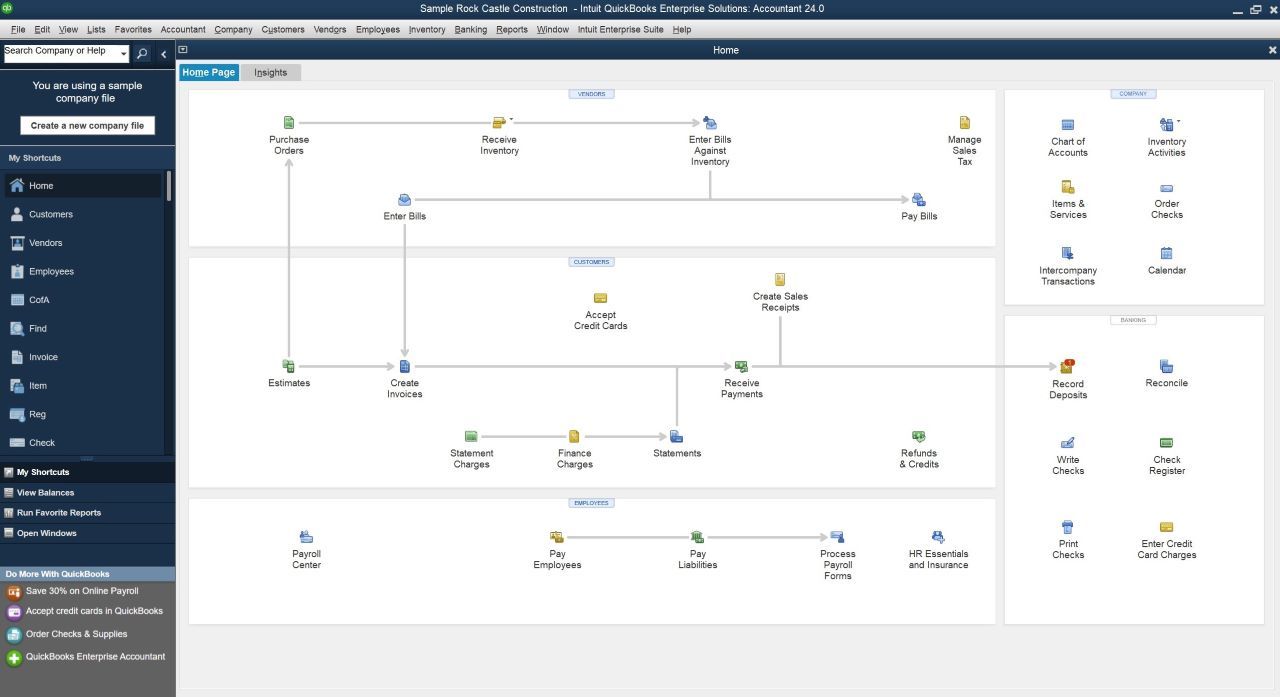
Locally installed on your computer. Appropriate for businesses that prefer local data storage and have specific industry requirements such as deep inventory needs, complex construction features, manufacturing / assembly inventory solutions, to name a few. This software CAN be accessed remotely from any device with internet connection, but must be configured to do so.
QuickBooks Desktop Classes ->
QuickBooks Enterprise Homepage

HOW TO JOIN


A flexible, convenient and cost-effective way to receive comprehensive, instructor-led QuickBooks training


QuickBooks Online Classes -> QuickBooks Desktop Classes ->

01 CONNECTION


Joining your live online training is easy. A week before your class, we'll email you everything you need - including your meeting connection links, easy-to-follow instructions, and course materials. 

02 COMMUNICATION


Choose the communication method that works best for you. Before class begins, we make sure everyone has a reliable way to communicate with us so that questions and assistance can be answered in real time.

03 WHAT ELSE IS NEEDED


All you need is a willingness to learn, a computer with high-speed internet, and a way to communicate during class. QuickBooks software is not required unless you want to follow along with the instructor (optional).


Mastering QuickBooks in one of our online classes is a quick and convenient way to learn the program without having to take 2 full days away from your work.

Instead of spending two full days in an online class, we divide the training into two or three convenient half day sessions, keeping each session to four hours or less. This gives you the time to absorb the material, ask questions, and put what you learn into practice, without overwhelming your schedule.


Our experienced, patient, and friendly instructors are with you throughout every session. We take the time to make sure you understand the material, answer your questions as they arise, and help you work through specific QuickBooks issues you may encounter. 

Whether you're starting from scratch, looking to improve your skills, or need help getting your QuickBooks company functioning efficiently, we're here to help you get up and running with confidence.


Have questions or want to learn more? Let us know how we can help and one of our instructors will get back to you as quickly as possible.


We look forward to helping you master QuickBooks and achieving success with this program and with your job!



  • What time does the Quickbooks class begin and end each day?

    Class begins each day at 9:00 am Pacific Time (12:00 pm Eastern time). We end by 1pm Pacific (or 4pm Eastern).  Please adjust for your time zone accordingly.

  • Is this an actual class? Or is it a self paced video lesson? Please explain.

    This is a live, instructor-led QuickBooks class that mirrors in-person classroom training in every way. You’ll receive a meeting link, outline, and guidebook the week before class. On the day of training, simply join the session and work alongside the instructor on a sample company IF you wish to practice along, which is not required. The instructor can provide you with your own sample company to use during the course if so. (Note: it is recommended that you have a 2nd monitor or computer if you wish to practice hands on - so that  you do not miss what your instructor is reviewing during her demonstrations. As well, cameras are not needed, nor used during the class).


    You can ask questions and participate just like in a regular classroom — using your computer’s microphone, a phone, a headset, or the chat feature. Everyone can hear one another, and questions are addressed in real time. This is a fully interactive experience, not a lecture nor a read-from-a-script presentation.

  • What do I need to join the training class?

    The only thing you need is a computer with a high-speed Internet connection (and the audio as mentioned above).  You do NOT need QuickBooks software to join the class. We will be connected to and working from the instructor's computer, which has a sample practice company to work from during the class.  However, if you do have Quickbooks installed on your computer (desktop), you can open it during the training and practice along with the instructor for the hands on experience. For QBO, we will show you how to open a sample practice company at the start of training if you wish to follow along on your own.

  • Does I need to be on my company file during the class?

    No, you will be linked to the Instructor's computer via a meeting company (GoToMeeting.com) and we will be working through the lessons on his/her computer. 

  • Who will be leading this course?

    All of our trainers are Intuit Certified ProAdvisors who must pass a series of annual tests set by Intuit to lead our QuickBooks training courses — both online and in-person. With years of experience teaching these classes, they are fully prepared to answer any question you may have.

  • Can I work from home? Or do I need to be in my office?

    You can work from wherever you like. You only need a computer, so if you wish to work from home, your office, or from the beach (as long as you have Internet connection at the beach); it is entirely up to you from where you wish to work and log-in to the meeting. This course is a very convenient way to learn and master Quickbooks without having to leave your home or office. 

  • Is there a registration deadline?

    There is no registration deadline. Please note, however, that we are on a first come, first serve basis and we limit the number of attendees in each class so that the best possible individual attention can be given and so we can ensure everyone's questions are answered; so early registration is recommended, as we do close each class when it reaches capacity.


  • I am brand new to Quickbooks. Do you offer follow up training?

    Yes, for those who are brand new to this software; if you feel you would like to take the class again after you've had a chance to practice and work with it, you may join any future Online class up to 6 months after your original training, at no additional charge. Simply email your instructor and let him/her know that you would like to take the course again, and you will be included in the meeting links for the next training class.  We call this our "refresher" course.

  • What is your cancellation policy?

    Your reservation for the course is only guaranteed upon receipt of payment in full. Refunds for cancellations can only be honored if the request is made 7 days prior to the class date. We offer our online classes once per month, so if you need to cancel after the 7 days prior, you can be placed the next month's class, no problem.

  • What if I can only attend Day 1 this month and need to complete the other days the following month?

    Not a problem. Just let your instructor know that you need to take one day this month and the second and/or third day the following month, and it shall be done.

  • Are there breaks given during the course?

    Yes, we take 1 break during the 4 hour training session; for about 10-15 minutes.